Overview
Minimization Design (also called Covariate-Adaptive Randomization) assigns each incoming subject to the treatment arm that minimizes the overall imbalance across all prognostic factors simultaneously. It is particularly powerful when multiple covariates need to be balanced and pre-generating a list for every possible stratum combination (as in Stratified Permuted Block Design) is impractical.
Unlike block-based algorithms, Minimization computes every assignment in real time based on the current state of all allocated subjects.
How it works
- For each treatment arm, compute an imbalance score based on how subjects already assigned to that arm compare to the incoming subject on each covariate.
- Assign the subject to the arm with the lower imbalance score, with a probabilistic element (Soft Randomization Probability) to avoid full determinism.
Example — 2 covariates, 1:1 allocation:
Current totals when subject 12 is enrolled:
| Covariate | Category | TRT | PBO |
|---|---|---|---|
| NYHA Class | Class III | 4 | 2 |
| LVEF Method | Teichholz | 3 | 4 |
Subject 12 profile: NYHA Class III, Teichholz
Imbalance if TRT: (4+1) + (3+1) = 9
Imbalance if PBO: (2+1) + (4+1) = 8 ← lower
→ System assigns PBO (probability = Soft Randomization Probability setting).
When to use
Use Minimization Design when:
- There are more than 2–3 prognostic factors to balance (Stratified Permuted Block would create too many strata).
- The trial is small (< 100 subjects) and chance imbalance on important covariates is a real risk.
- The protocol requires balance across multiple factors simultaneously.
- Real-time assignment is acceptable (no pre-generated list needed).
For simple single-factor balance, Stratified Permuted Block Design is usually preferred. For no stratification, use Permuted Block Design.
Who uses this screen
The Randomization configuration screen is used by the Study Administrator to set up and manage the algorithm, study groups, covariates, eligibility questions, and notifications. Site staff (Investigators, CRCs) interact with randomization through the subject data capture workflow — they do not access this configuration page directly.
If you cannot open the Randomization app or the Edit buttons are greyed out, verify that the study is in Design status. Configuration changes are not permitted while the study is in Available, Locked, or Frozen status.
Typical workflow
- Open the study and navigate to Randomization in the left sidebar.
- Open the Blinding Method and Algorithm settings card and select Minimization Design.
- Save the algorithm selection — the Minimization Design settings card appears.
- Open Minimization Design Settings and configure study groups, level of imbalance evaluation, covariates to balance, types of imbalance evaluation, imbalance scope, and soft randomization probability.
- Configure Select event to Randomize — choose which study event triggers randomization.
- (Optional) Configure Additional data before Randomization — add eligibility questions.
- Configure Email Notification — choose which roles receive alerts on randomization.
Step-by-step configuration
Step 1 — Open the Randomization app
Sign in to your ClinicalDataS instance, open the study, and select Randomization from the left sidebar under Installed Apps.
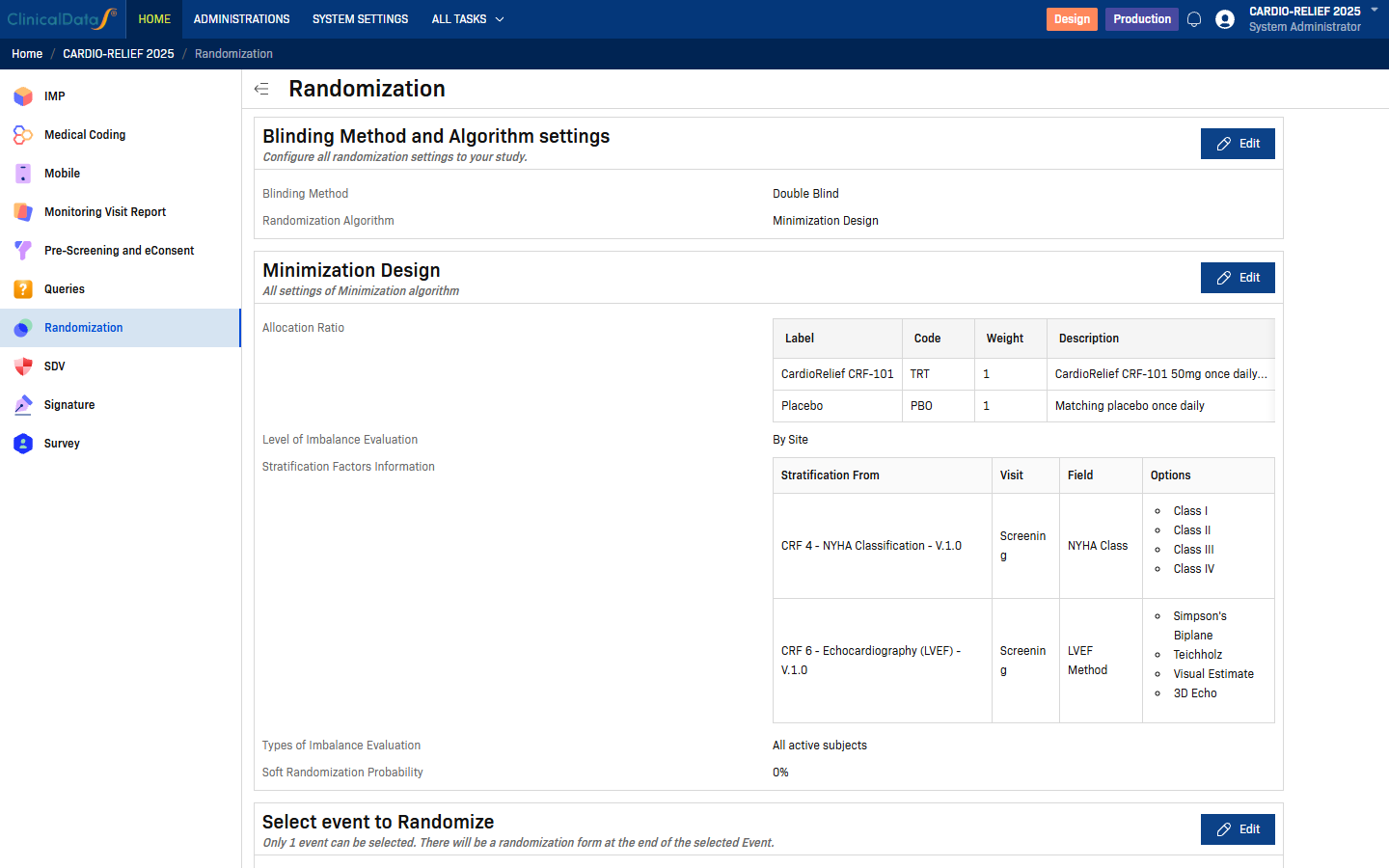
The Randomization page lists all configuration cards. If the study is in a non-Design status, most Edit buttons are disabled. To enable editing, change the study status to Design via the Change Status button on the study home page.
Step 2 — Select the Minimization Design algorithm
Click Edit on the Blinding Method and Algorithm settings card.
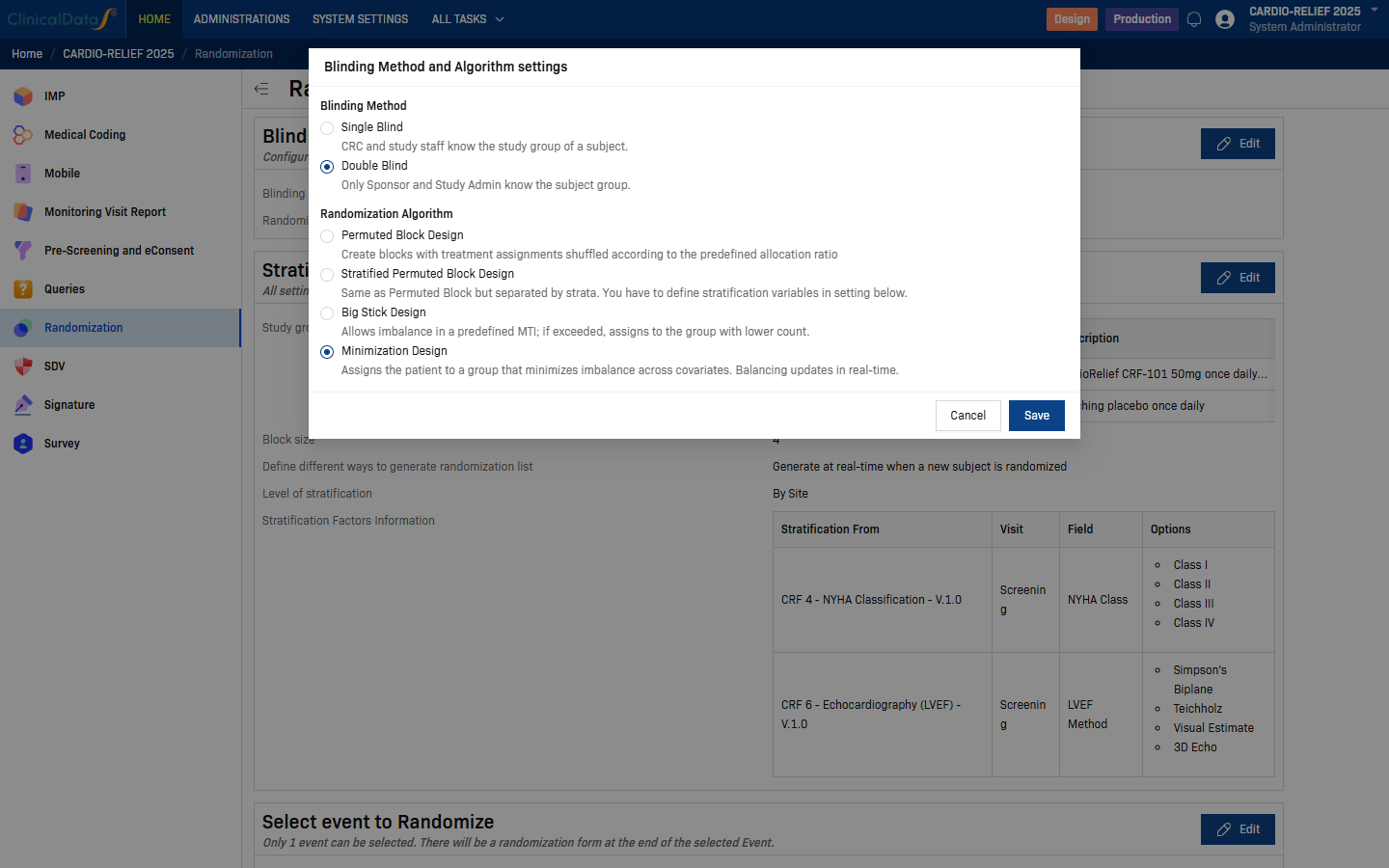
| Field | Options | Description |
|---|---|---|
| Blinding Method | Single Blind | CRC and study staff can see the subject's study group. |
| Double Blind | Only Sponsor and Study Administrator know the subject group. | |
| Randomization Algorithm | Permuted Block Design | Single-list randomization using balanced permuted blocks. |
| Stratified Permuted Block Design | Separate block lists per site/stratum combination. | |
| Big Stick Design | Allows imbalance up to a predefined MTI before forcing balance. | |
| Minimization Design | Assigns each subject to the arm that minimizes covariate imbalance in real time. |
Select Minimization Design, then click Save.
The page reloads and the Minimization Design settings card appears below Blinding Method and Algorithm settings.
Step 3 — Configure Minimization Design Settings
Click Edit on the Minimization Design card.
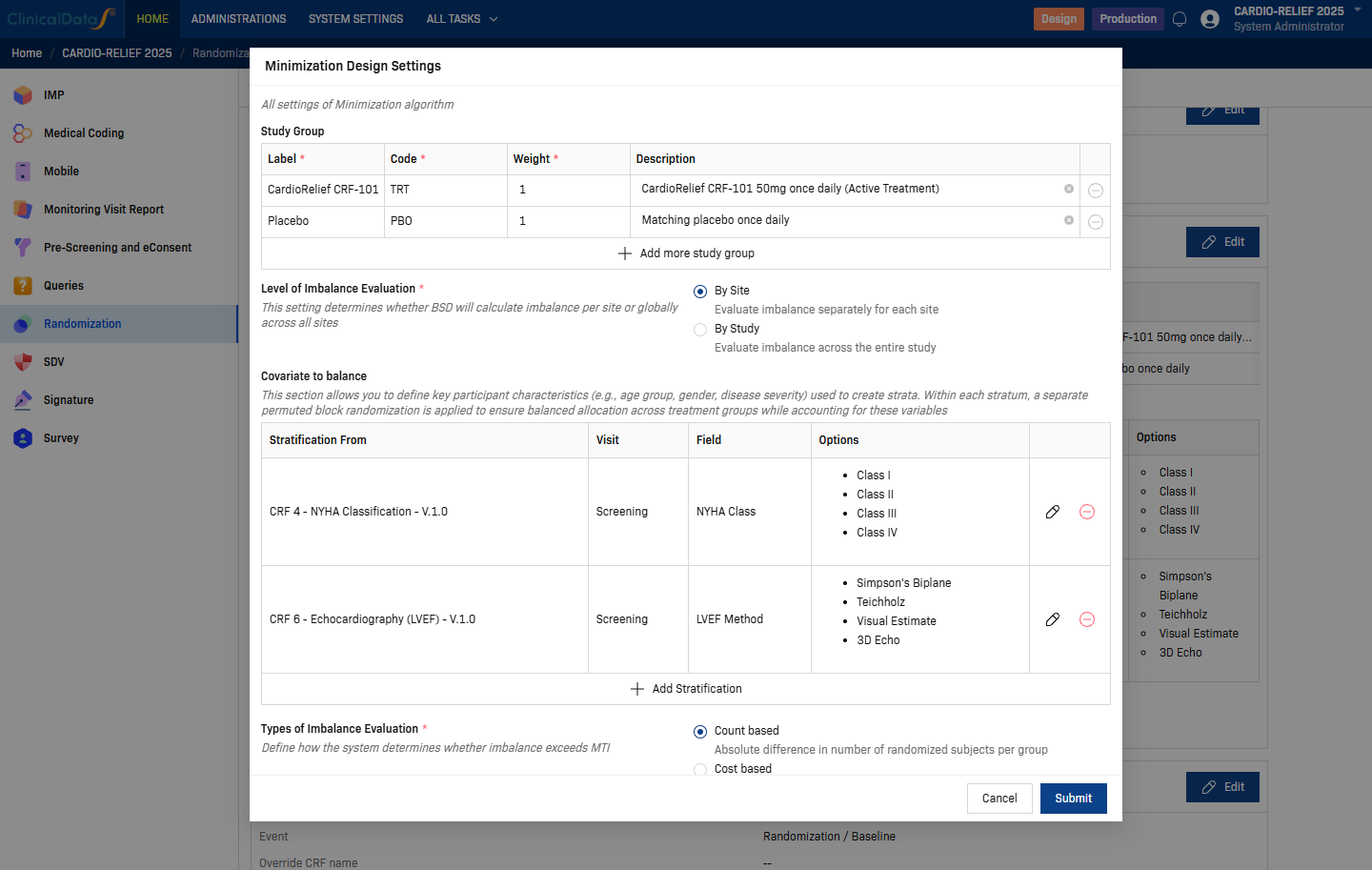
| Setting | Description |
|---|---|
| Study Group | One row per treatment arm. Each row requires: Label (display name), Code (short identifier, e.g. TRT, PBO), Weight (allocation ratio weight), Description (optional). Use + Add more study group to add arms. |
| Level of Imbalance Evaluation | Controls whether imbalance is computed per site or across the whole study — see options below. |
| Covariate to balance | One row per prognostic factor. Configured the same way as stratification factors — source CRF, visit, field, and auto-populated options. Use + Add Stratification to add rows. |
Level of Imbalance Evaluation options:
| Option | Description |
|---|---|
| By Site | Evaluates imbalance separately for each site. Balances covariates within each site independently. |
| By Study | Evaluates imbalance across the entire study. Uses a single global balance calculation. |
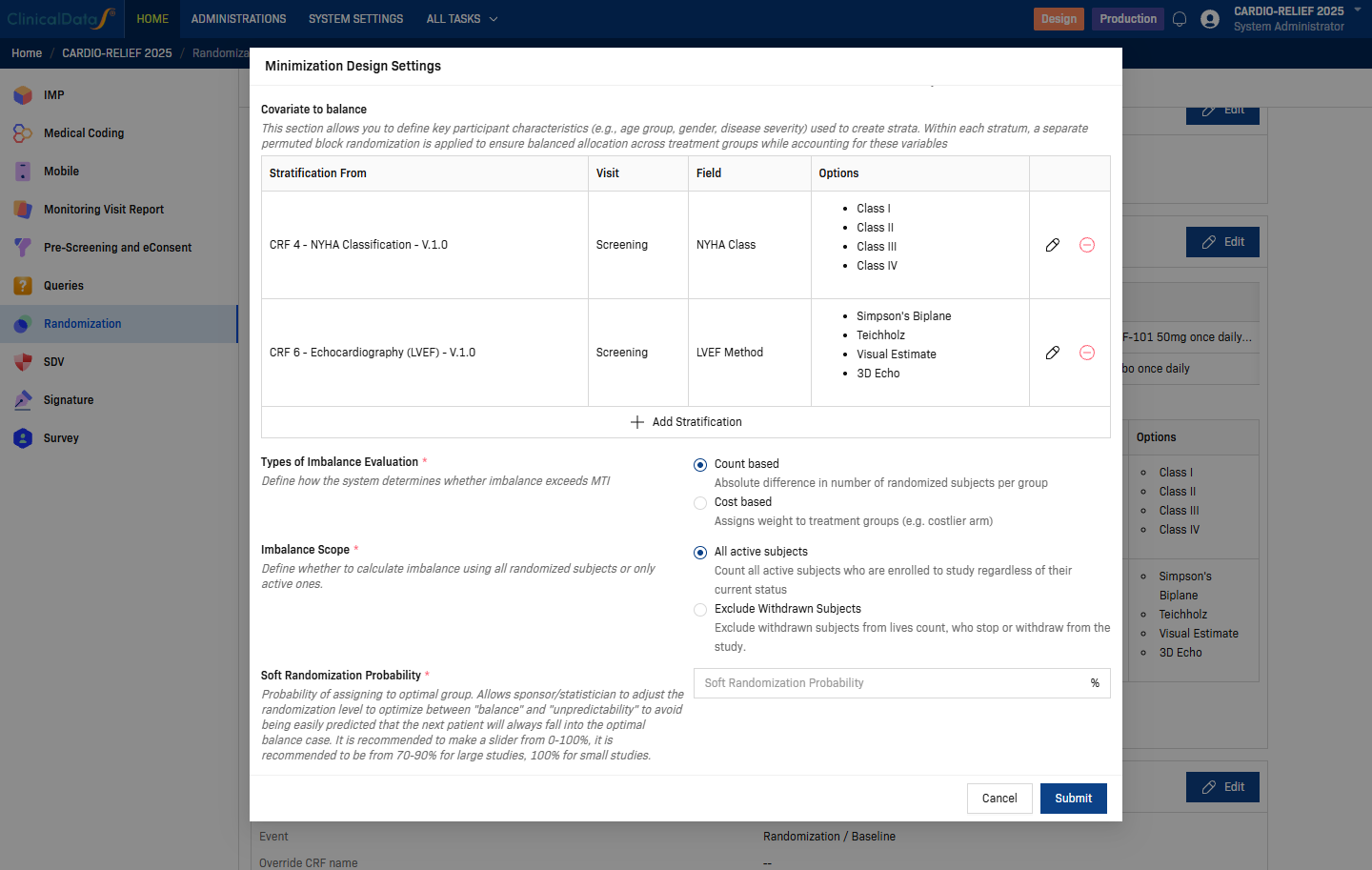
| Setting | Description |
|---|---|
| Types of Imbalance Evaluation | How imbalance is measured — see options below. |
| Imbalance Scope | Which subjects are counted — see options below. |
| Soft Randomization Probability | Probability (0–100%) of assigning to the optimal (minimizing) arm. Recommended 70–90% for large studies, 100% for small studies. Higher values give better balance; lower values improve unpredictability. |
Types of Imbalance Evaluation options:
| Option | Description |
|---|---|
| Count based | Absolute difference in number of randomized subjects per group. |
| Cost based | Assigns weight to treatment groups (e.g. costlier arm). Adjusts the imbalance scoring. |
Imbalance Scope options:
| Option | Description |
|---|---|
| All active subjects | Count all active subjects enrolled in the study regardless of their current status. |
| Exclude Withdrawn Subjects | Exclude subjects who have stopped or withdrawn from the study from the imbalance count. |
Prerequisite: Only Radio and Checkbox CRF fields can be used as covariates. The field must exist in the CRF before you can select it here. See Form Builder for field type guidance.
Click Submit to save.
Step 4 — Select event to Randomize
Click Edit on the Select event to Randomize card.
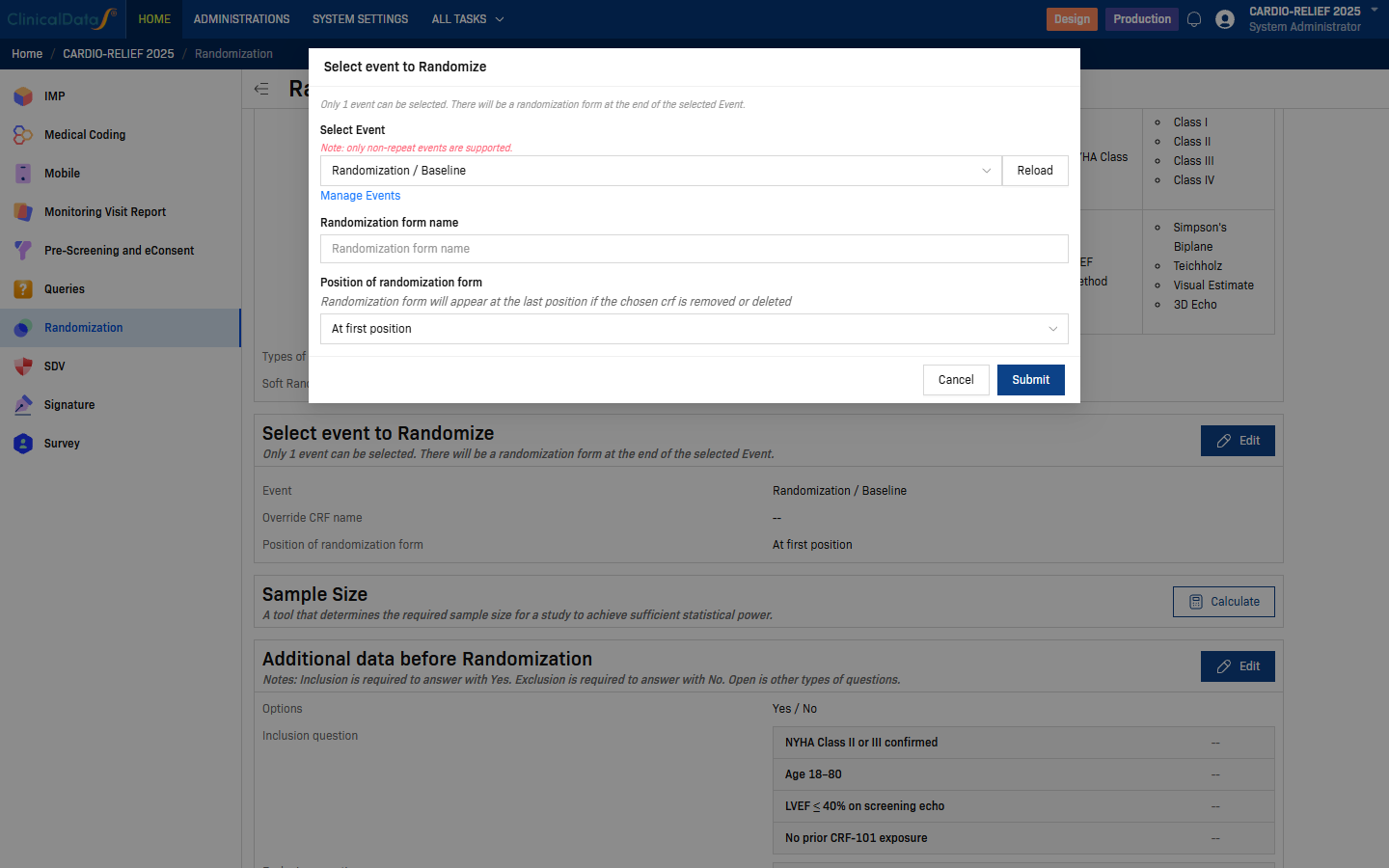
| Field | Description |
|---|---|
| Select Event | Choose the study event at which randomization takes place. Only non-repeat events are supported. Use Reload to refresh the list if you recently added events. Click Manage Events to navigate to the event setup page. |
| Randomization form name | Optional. Override the default name of the randomization CRF. Leave blank to use the system default. |
| Position of randomization form | Where the randomization form appears within the selected event. Default: At first position. |
Click Submit to save.
Step 5 — Additional data before Randomization (optional)
Click Edit on the Additional data before Randomization card to define eligibility questions that site staff must answer before a subject can be randomized.
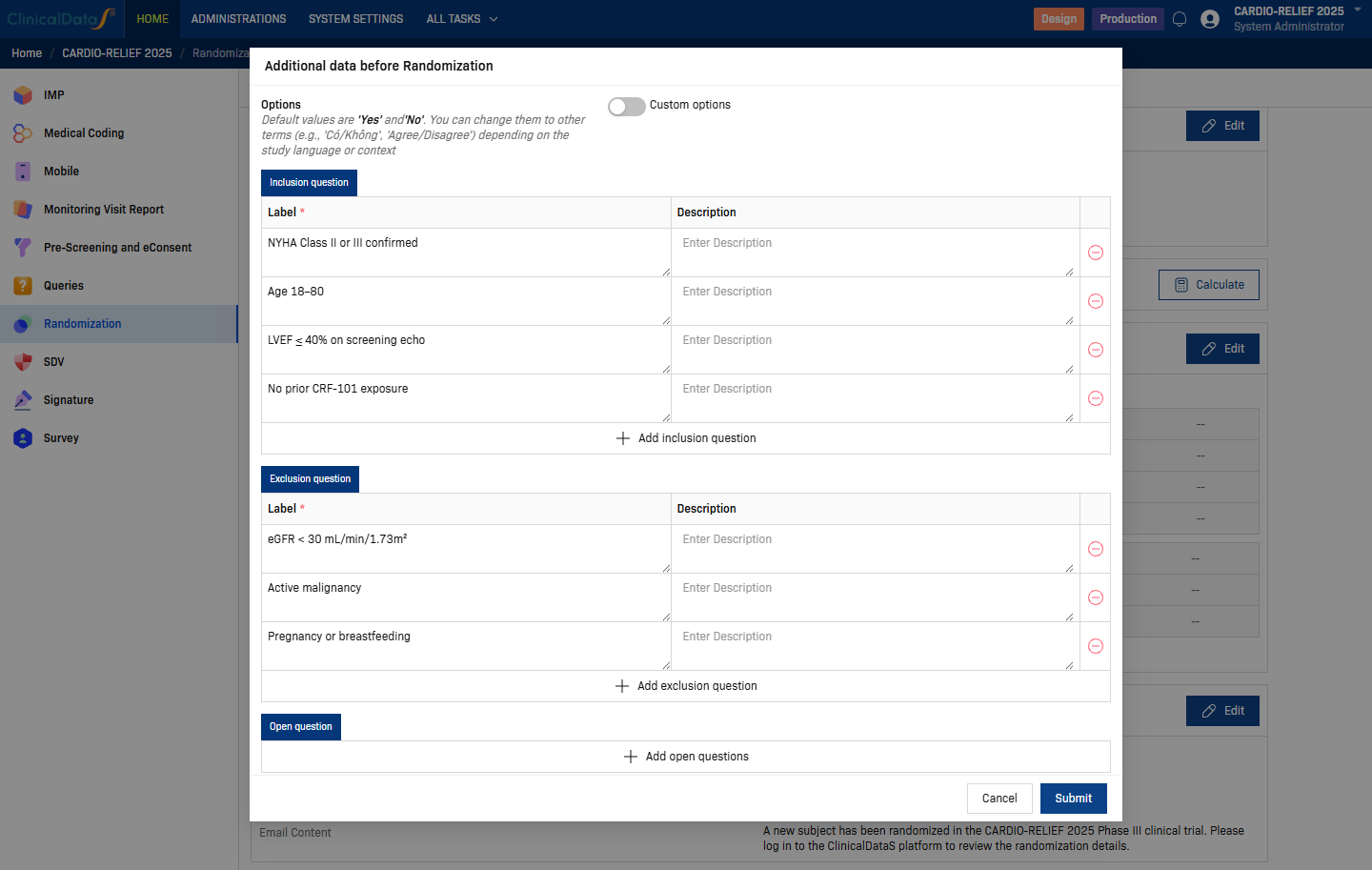
Three question types are supported:
| Section | Behaviour | Example |
|---|---|---|
| Inclusion question | Must be answered Yes to proceed. | "NYHA Class II or III confirmed" |
| Exclusion question | Must be answered No to proceed. | "Active malignancy" |
| Open question | Free-text or other answer type; no pass/fail logic. | Any additional data collection |
Use + Add inclusion question / + Add exclusion question / + Add open questions to add rows. Click Submit to save.
Step 6 — Email Notification
Click Edit on the Email Notification card to configure which roles receive an automated email when a subject is randomized.

| Field | Description |
|---|---|
| Send email notification to following recipients | Check one or more roles: Study Administrator, Study Sponsor, Site Monitor, Study Monitor, Investigator, Clinical Research Coordinator. |
| Also send email to following recipients | Enter individual email addresses (up to 30), separated by colons. Useful for external stakeholders not in the system. |
| Email Subject | Subject line of the notification email. |
| Email Content | Rich-text body of the notification email. The system pre-fills a default template: "A new subject has been randomized in the [Study Name] Phase III clinical trial. Please log in to the ClinicalDataS platform to review the randomization details." Edit the template as needed. Click View all Variables to insert dynamic placeholders (e.g. subject ID, randomization date, site name). |
Click Submit to save.
Comparison with other algorithms
| Property | Permuted Block | Stratified Permuted Block | Big Stick | Minimization |
|---|---|---|---|---|
| Balance guarantee | Within blocks | Within blocks per stratum | Within MTI | Across all factors simultaneously |
| Number of factors supported well | 0 | 2–3 | 0 | Many |
| Allocation concealment | Moderate | Moderate | Better | Variable (depends on probability) |
| Suitable for small trials | Moderate | Moderate | Moderate | Best |
| Pre-generatable list | Yes | Yes | No | No |
| Complexity | Low | Moderate | Moderate | High |
Statistical considerations
- The randomization procedure must be fully described in the Statistical Analysis Plan (SAP) before data lock, including the covariates, imbalance evaluation type, and soft randomization probability.
- Minimization creates dependency between assignments — always analyze data adjusting for the covariate factors used in the minimization.
- For confirmatory Phase III trials, discuss use of Minimization with your regulatory agency before finalization — some agencies prefer Stratified Permuted Block for predictability.
Regulatory acceptance
Minimization is described in Taves (1974) and Pocock & Simon (1975) and is accepted by ICH E9 §3.4 and the FDA's Adaptive Designs guidance. It is more commonly used in academic and early-phase industry trials. Document fully in the protocol and randomization SOP.
Related topics
- Randomization Overview — all configuration cards and blinding options
- Permuted Block Design — simple single-list block randomization
- Stratified Permuted Block Design — separate block lists per site/stratum
- Big Stick Design — tolerates short-term imbalance within a predefined MTI