Overview
Stratified Permuted Block Design extends Permuted Block Randomization by maintaining separate randomization lists for each unique combination of stratification factors and site. This guarantees that treatment arms are balanced not only overall, but also within each clinically meaningful subgroup.
It is the most common algorithm for double-blind, multi-site Phase II/III confirmatory trials.
How it works
- All defined stratification factors (e.g., NYHA Class, LVEF Method) are combined with the site identifier to form a stratum key.
- A separate permuted block list is maintained for each stratum key.
- When a subject is randomized, the system reads their stratification variable values and site, looks up the correct stratum list, and assigns the next available allocation.
Example — 2 stratification factors, 2 sites:
| Stratum key | Separate block list |
|---|---|
| Site 01 / NYHA II / Simpson's Biplane | [TRT, PBO, TRT, PBO, …] |
| Site 01 / NYHA II / Teichholz | [PBO, TRT, PBO, TRT, …] |
| Site 01 / NYHA III / Simpson's Biplane | [TRT, TRT, PBO, PBO, …] |
| Site 02 / NYHA II / Simpson's Biplane | [PBO, TRT, TRT, PBO, …] |
| … | … |
Each stratum is balanced independently, so the final analysis can adjust for the stratification factors and site with full statistical validity.
When to use
Use Stratified Permuted Block Design when:
- The trial has multiple sites and site-level balance is required.
- One or more baseline characteristics (prognostic factors) need to be balanced across arms.
- The protocol specifies stratified randomization (common in Phase III trials).
- The regulatory submission requires proof of balance on key covariates.
For single-site trials without stratification needs, use Permuted Block Design instead.
Who uses this screen
The Randomization configuration screen is used by the Study Administrator to set up and manage the algorithm, study groups, stratification factors, eligibility questions, and notifications. Site staff (Investigators, CRCs) interact with randomization through the subject data capture workflow at the designated randomization event — they do not access this configuration page directly.
If you cannot open the Randomization app or the Edit buttons are greyed out, verify that the study is in Design status. Configuration changes are not permitted while the study is in Available, Locked, or Frozen status.
Typical workflow
- Open the study and navigate to Randomization in the left sidebar.
- Open the Blinding Method and Algorithm settings card and select Stratified Permuted Block Design.
- Save the algorithm selection — the Stratified Permuted Block Design settings card appears.
- Open Stratified Permuted Block Settings and configure study groups, block size, list generation method, level of stratification, and stratification factors.
- Configure Select event to Randomize — choose which study event triggers randomization.
- (Optional) Configure Additional data before Randomization — add eligibility questions.
- Configure Email Notification — choose which roles receive alerts on randomization.
Step-by-step configuration
Step 1 — Open the Randomization app
Sign in to your ClinicalDataS instance, open the study, and select Randomization from the left sidebar under Installed Apps.
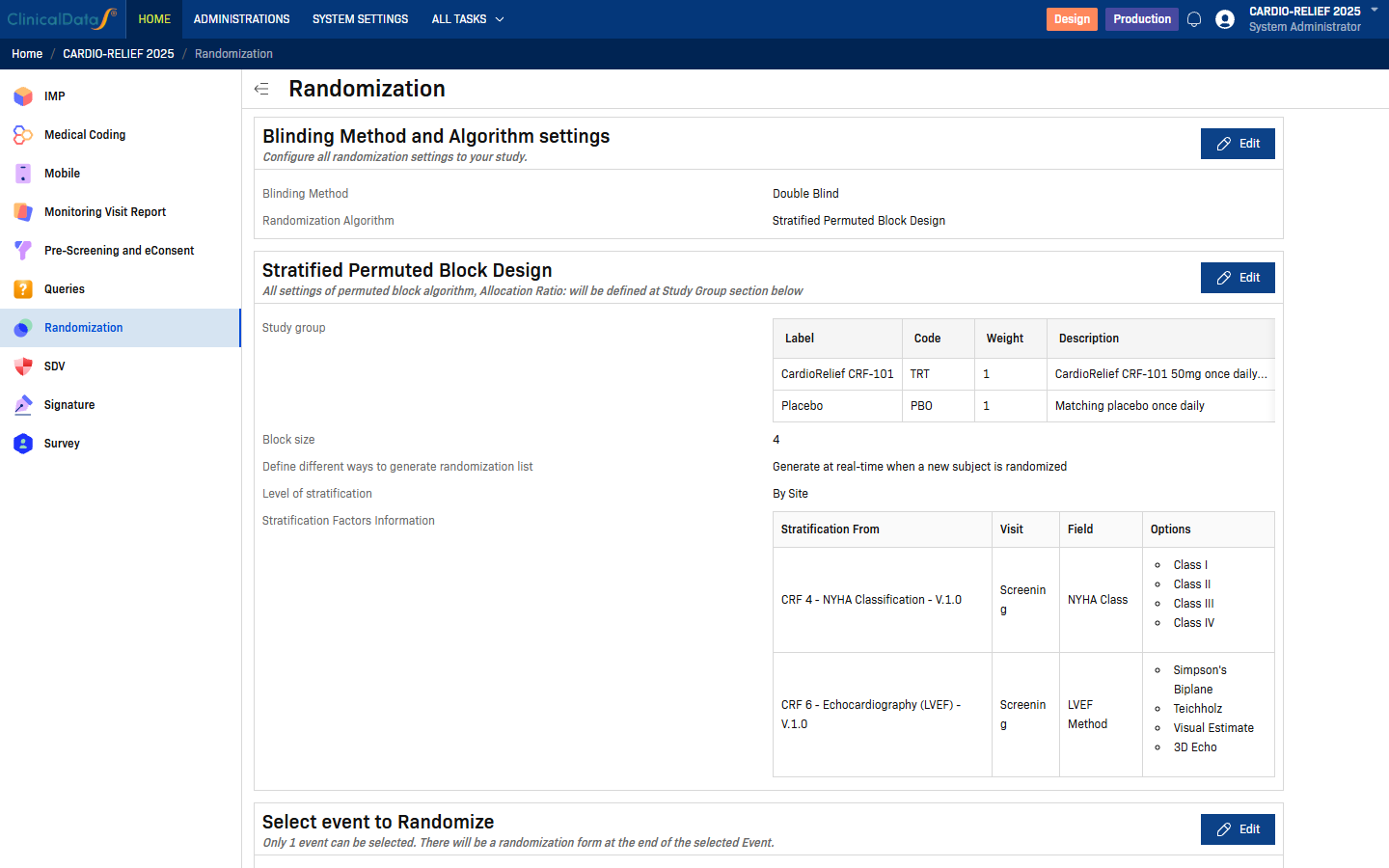
The Randomization page lists all configuration cards. If the study is in a non-Design status, most Edit buttons are disabled. To enable editing, change the study status to Design via the Change Status button on the study home page.
Step 2 — Select the Stratified Permuted Block Design algorithm
Click Edit on the Blinding Method and Algorithm settings card.
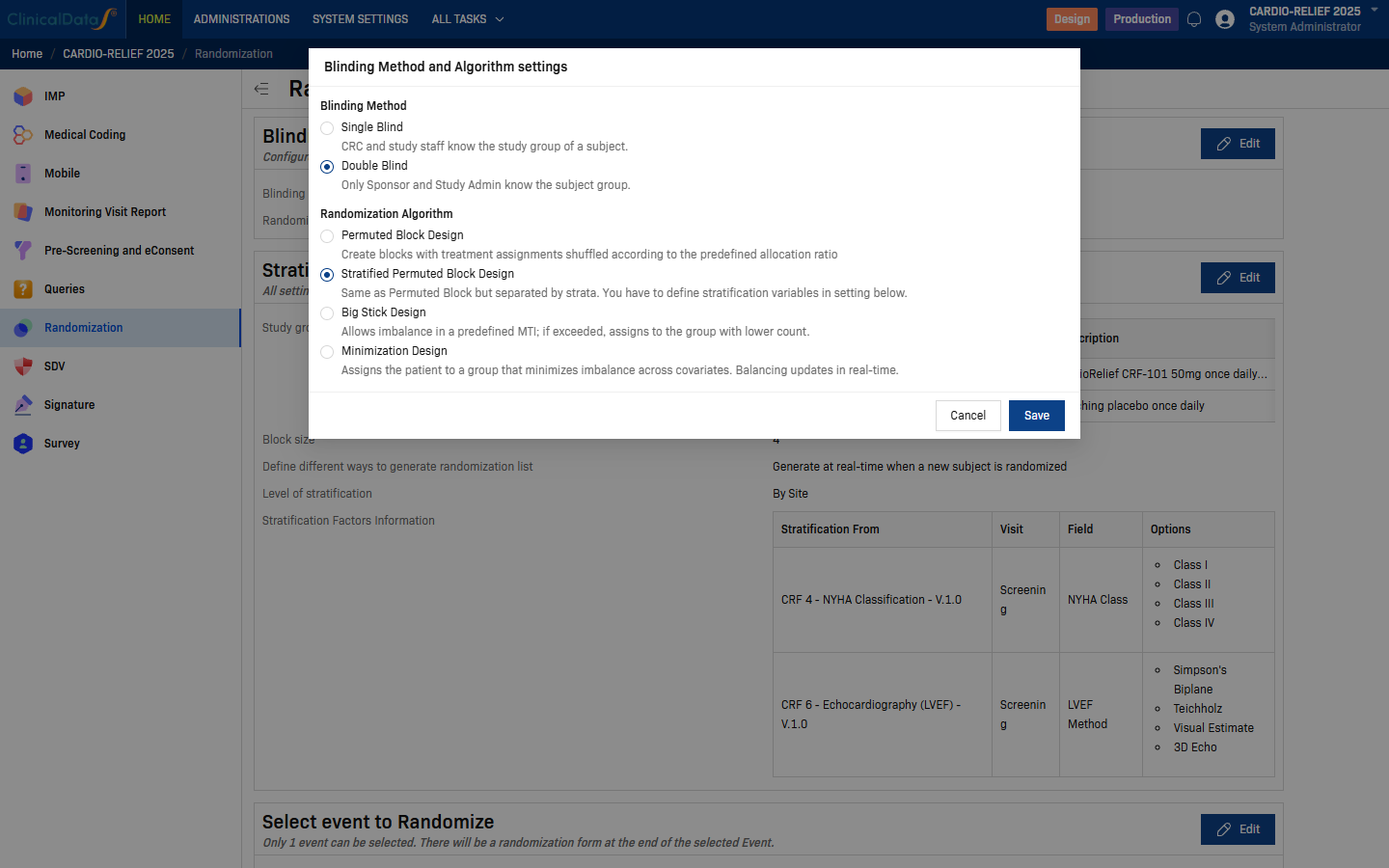
| Field | Options | Description |
|---|---|---|
| Blinding Method | Single Blind | CRC and study staff can see the subject's study group. |
| Double Blind | Only Sponsor and Study Administrator know the subject group. | |
| Randomization Algorithm | Permuted Block Design | Single-list randomization using balanced permuted blocks. |
| Stratified Permuted Block Design | Separate lists per site/stratum combination. | |
| Big Stick Design | Allows imbalance up to a predefined MTI before forcing balance. | |
| Minimization Design | Covariate-adaptive allocation minimizing group imbalance. |
Select Stratified Permuted Block Design, then click Save.
The page reloads and the Stratified Permuted Block Design settings card appears below Blinding Method and Algorithm settings.
Step 3 — Configure Stratified Permuted Block Settings
Click Edit on the Stratified Permuted Block Design card.
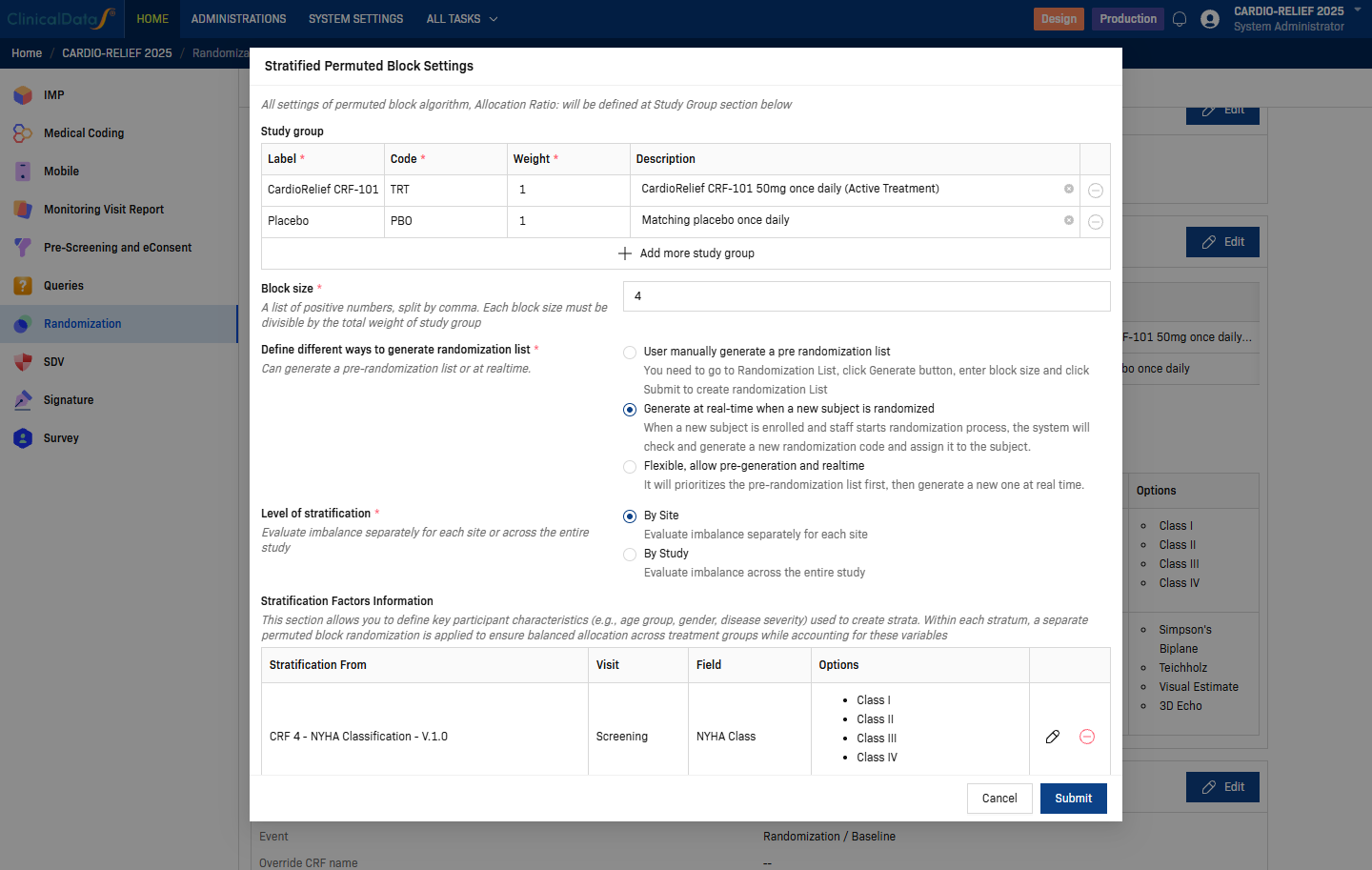
| Setting | Description |
|---|---|
| Study Group | One row per treatment arm. Each row requires: Label (display name), Code (short identifier, e.g. TRT, PBO), Weight (allocation ratio weight), Description (optional). Use + Add more study group to add arms. |
| Block size | One or more positive integers separated by commas. Each block size must be divisible by the total weight sum of all study groups. For a 1:1 allocation (total weight = 2), valid sizes are 2, 4, 6, 8, … |
| Define different ways to generate randomization list | How the randomization list is created — see options below. |
| Level of stratification | Controls whether separate lists are maintained per site or across the entire study — see below. |
List generation options:
| Option | Description |
|---|---|
| User manually generate a pre-randomization list | Go to Randomization List, click Generate, enter the block size, and click Submit to create the list before any subject is randomized. |
| Generate at real-time when a new subject is randomized (recommended) | The system checks and generates a new randomization code automatically at the moment a subject is enrolled and the randomization process starts. |
| Flexible, allow pre-generation and realtime | Uses the pre-generated list first; if no pre-generated list exists, falls back to real-time generation. |
Level of stratification options:
| Option | Description |
|---|---|
| By Site | Evaluates imbalance separately for each site. Creates a separate block list for each site + stratum combination. Most common for multi-site trials. |
| By Study | Evaluates imbalance across the entire study. Uses a single set of strata shared across all sites. |
Stratification Factors Information
The lower section of the dialog defines the stratification variables. Each factor adds a dimension to the stratum key.
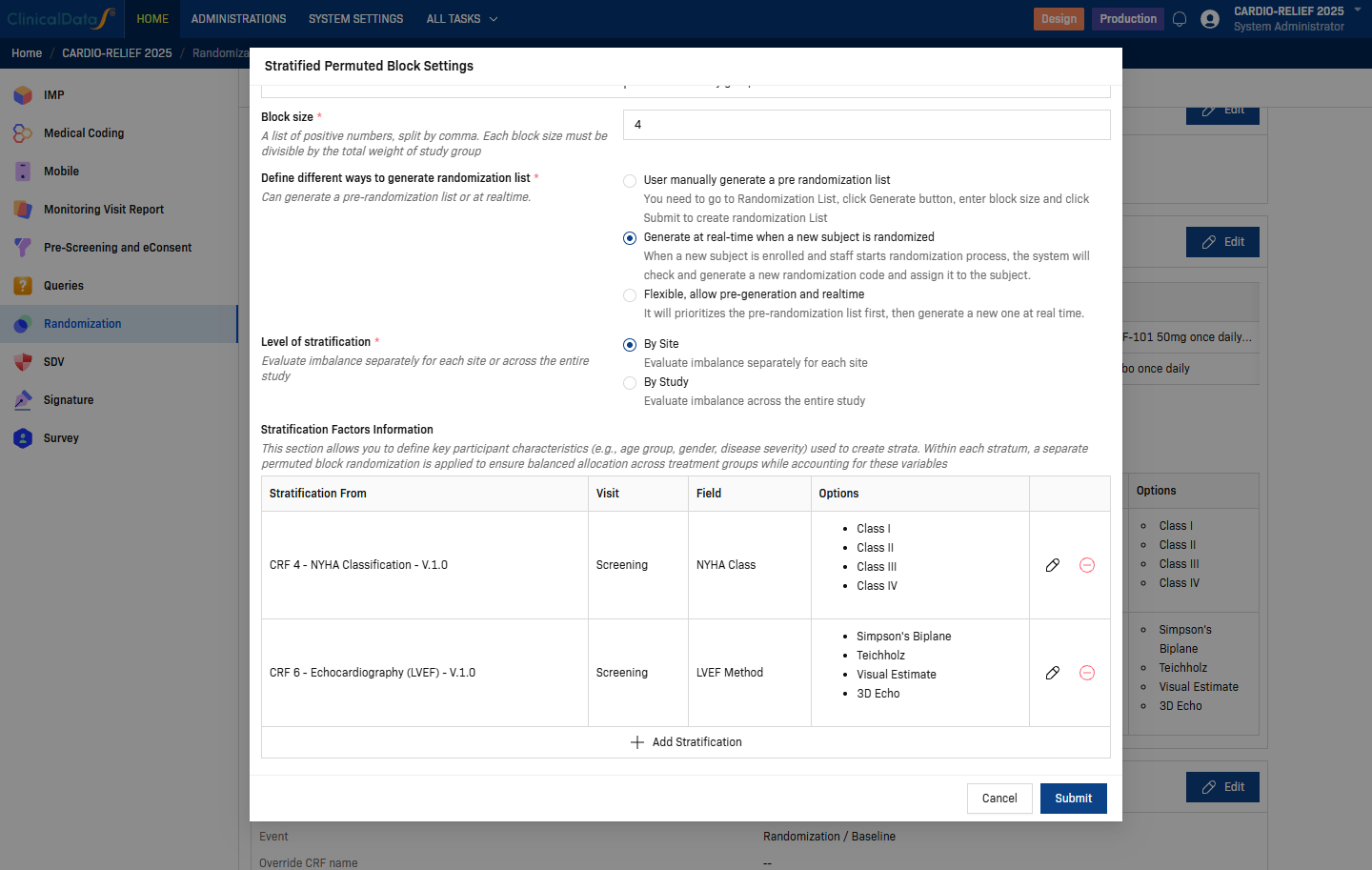
For each factor, configure the following:
| Field | Description |
|---|---|
| Stratification From | Source CRF containing the stratification variable. |
| Visit | The study event when the variable is collected (e.g., Screening). |
| Field | The Radio or Checkbox field name within the CRF. |
| Options | Auto-populated from the field's answer choices (e.g., Class I, Class II, Class III, Class IV). |
Use + Add Stratification to add more rows. Click Submit to save all settings.
Prerequisite: Only Radio and Checkbox CRF fields can be used as stratification variables. The field must exist in the CRF before you can select it here. See Form Builder for field type guidance.
Step 4 — Select event to Randomize
Click Edit on the Select event to Randomize card.
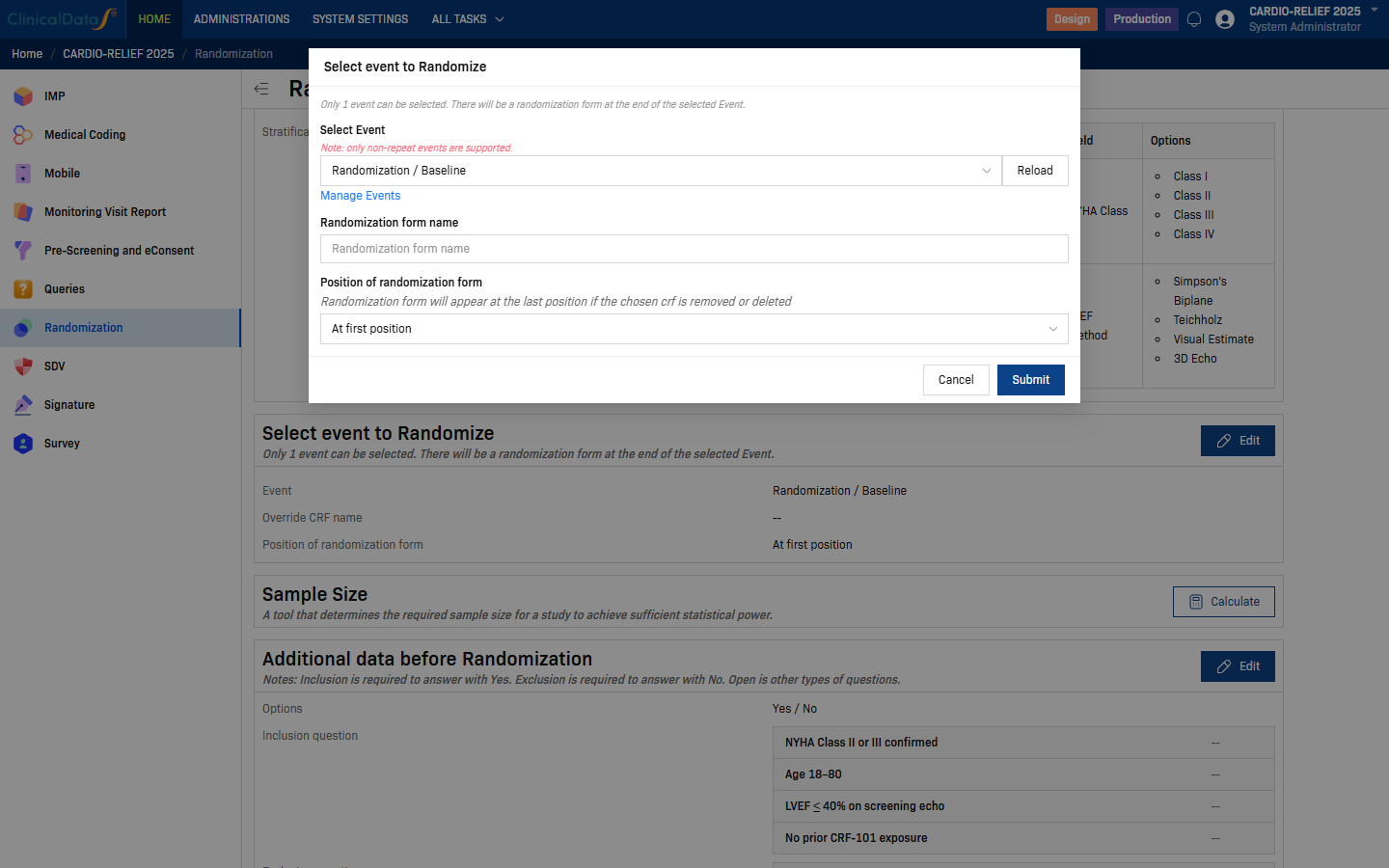
| Field | Description |
|---|---|
| Select Event | Choose the study event at which randomization takes place. Only non-repeat events are supported. Use Reload to refresh the list if you recently added events. Click Manage Events to navigate to the event setup page. |
| Randomization form name | Optional. Override the default name of the randomization CRF. Leave blank to use the system default. |
| Position of randomization form | Where the randomization form appears within the selected event. Default: At first position. |
Click Submit to save.
Step 5 — Additional data before Randomization (optional)
Click Edit on the Additional data before Randomization card to define eligibility questions that site staff must answer before a subject can be randomized.
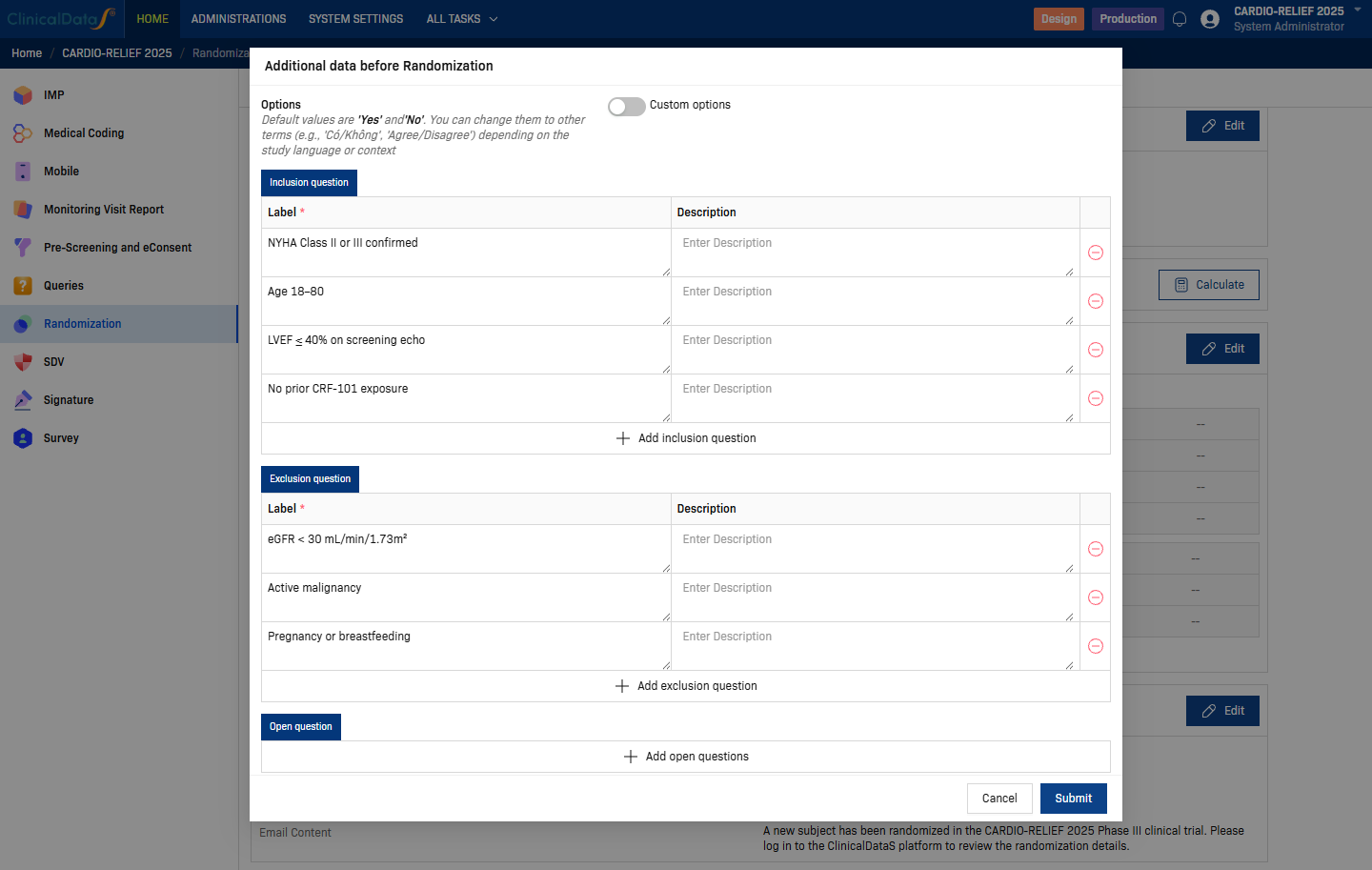
Three question types are supported:
| Section | Behaviour | Example |
|---|---|---|
| Inclusion question | Must be answered Yes to proceed. | "NYHA Class II or III confirmed" |
| Exclusion question | Must be answered No to proceed. | "Active malignancy" |
| Open question | Free-text or other answer type; no pass/fail logic. | Any additional data collection |
The Options toggle lets you replace the default Yes/No labels with custom text (e.g. Có/Không, Agree/Disagree) for studies in other languages.
Use + Add inclusion question / + Add exclusion question / + Add open questions to add rows. Click Submit to save.
Step 6 — Email Notification
Click Edit on the Email Notification card to configure which roles receive an automated email when a subject is randomized.
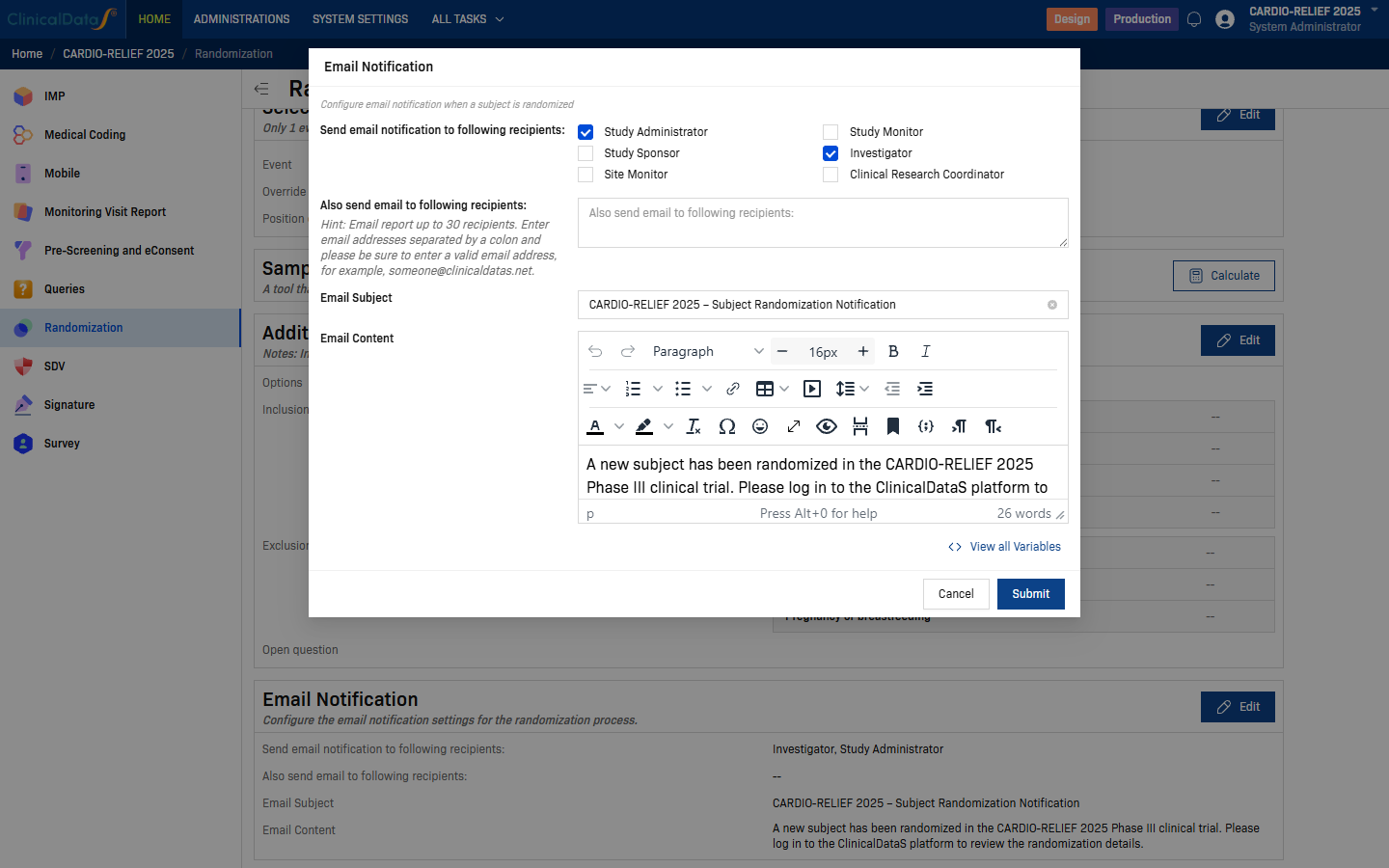
| Field | Description |
|---|---|
| Send email notification to following recipients | Check one or more roles: Study Administrator, Study Sponsor, Site Monitor, Study Monitor, Investigator, Clinical Research Coordinator. |
| Also send email to following recipients | Enter individual email addresses (up to 30), separated by colons. Useful for external stakeholders not in the system. |
| Email Subject | Subject line of the notification email. |
| Email Content | Rich-text body of the notification email. Click View all Variables to insert dynamic placeholders (e.g. subject ID, randomization date). |
Click Submit to save.
Number of strata
Total strata = (options in factor 1) × (options in factor 2) × … × (number of sites, if By Site)
| Factors | Options | Sites | Total strata |
|---|---|---|---|
| 1 factor, 3 options | 3 | 5 | 15 |
| 2 factors, 4 options each | 4 × 4 = 16 | 10 | 160 |
| 3 factors, 3 options each | 3 × 3 × 3 = 27 | 8 | 216 |
Important: Many strata remain under-enrolled in most trials. Each stratum with an odd number of subjects at study close will be slightly imbalanced. Limit stratification factors to those that are strong prognostic factors per the statistical analysis plan.
Regulatory acceptance
Stratified randomization is endorsed by ICH E9 §3.4 and is the standard approach in most Phase III confirmatory trials. The stratification factors and block sizes used must be pre-specified in the protocol and randomization SOP before trial start.
Related topics
- Randomization Configuration — all configuration cards and blinding options
- Permuted Block Design — simpler single-list randomization without stratification
- Big Stick Design — tolerates short-term imbalance within a predefined MTI
- Minimization Design — covariate-adaptive allocation